

STEP 1: Simply click on the
 button of the post you want to quote...
 You'll find it in the top right hand corner of their post...
 Yup, way over there...
STEP 2: When you click on the quote button in their post, you'll see this...

STEP 3: If you don't want to include ALL of their post in the quote, highlight
the parts you don't want and simply delete them,
 being very careful to
 leave intact the [ quote="Hippy Chippy"] and [ /quote] at the start and
finish of the part of the quote you want to keep, as shown below...
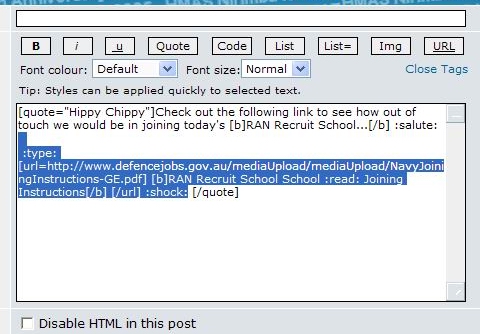
STEP 4: Add your own comments below the quote to reply to it, like so...
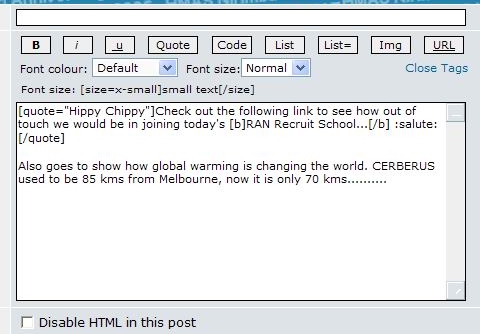
STEP 5: Hit [Submit] and your post will then look like the one below...
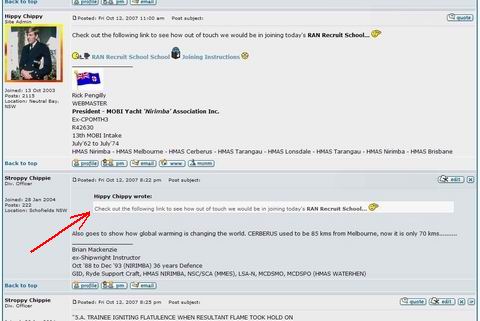
Which you'll agree, looks smarter/ less confusing than doing it this way...
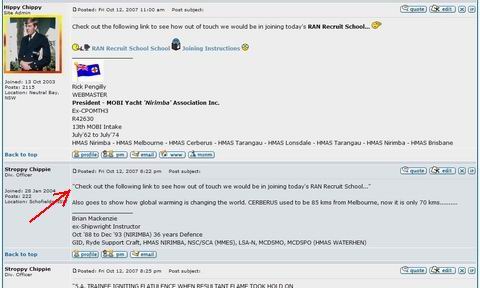
i.e., by just using quotation marks on a 'copy and paste' from an earlier post...
Hope that helps Folks... Here endeth the lesson on 'QUOTING'...!


 BTW... You can also quote a post from an unrelated Topic, posting it into a Topic of your choice...


